FoxEncoder4.6.0
Publisher Description
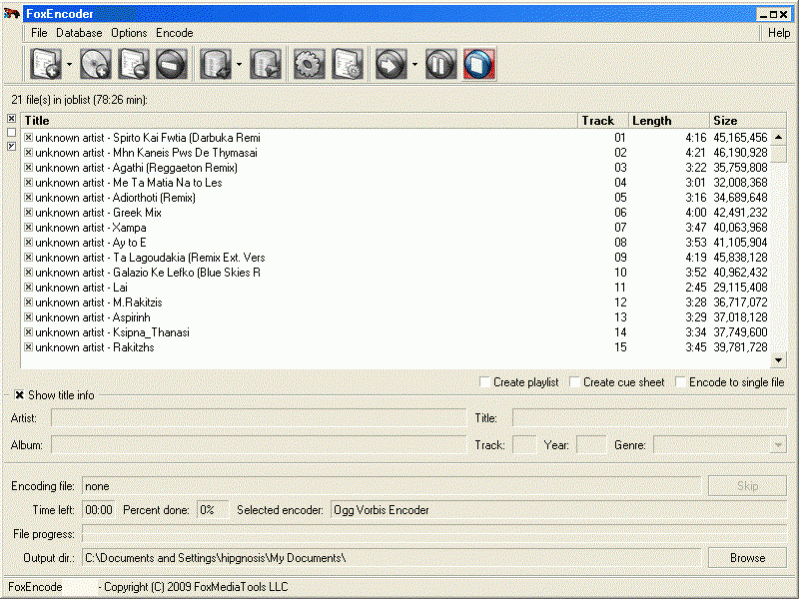
FoxEncoder is an all-in-one audio tool created for CD ripping, audio encoding and converting into multiple formats. It offers support for MP3, MP4/M4A, Ogg Vorbis, AAC, Bonk and FLAC files.
FoxEncoder makes an excellent solution for converting your audio files into the formats you want to compress for storage, work with on various projects, listen to on your portable devices and other.
Installing and running the program is amazingly easy and once you figure out the main functions (which are clearly visible and labeled) you'll appreciate the options of General Settings. Apart from Encoders and Playlists (you have the ability to set playlists) you get a CD Ripping option, CDDB/freedb online CD database (lets you access online database to add track info while converting) and CDText, Plug-ins and Info Tags to manage all data associated with your audio files.
In addition to the wide range of features it offers, FoxEncoder provides you with an integrated player so you can easily listen to the sound files you'd like to or you've already converted. The program allows you to set a FLAC encoder configuration for different levels.
About FoxEncoder
This Audio Encoders/Decoders program is available in English. It was last updated on 29 September, 2026. FoxEncoder is compatible with the following operating systems: Windows.
The company that develops FoxEncoder is FoxMediaTools. The latest version released by its developer is 4.6.0. This version was rated by 4 users of our site and has an average rating of 2.5.
The download we have available for FoxEncoder has a file size of 2.1 MB. Just click the green Download button above to start the downloading process. The program is listed on our website since 2018-10-17 and was downloaded 195 times. We have already checked if the download link is safe, however for your own protection we recommend that you scan the downloaded software with your antivirus. Your antivirus may detect the FoxEncoder as malware if the download link is broken.
How to install FoxEncoder on your Windows device:
- Click on the Download button on our website. This will start the download from the website of the developer.
- Once the FoxEncoder is downloaded click on it to start the setup process (assuming you are on a desktop computer).
- When the installation is finished you should be able to see and run the program.
Program Details
System requirements
Download information
Pricing
Version History
version 4.6.0
posted on 2018-10-17
Major updates for interface and functionality.
